


GloBro
3.67.00 Reviews
App Specs
- Version
- 1.9
- Updated On
- License
- Free
- Downloads
- 1,000,000+
- Developer
- Pizzawale Team
- Categories
- Communication
- Platform
- Android
Screenshots
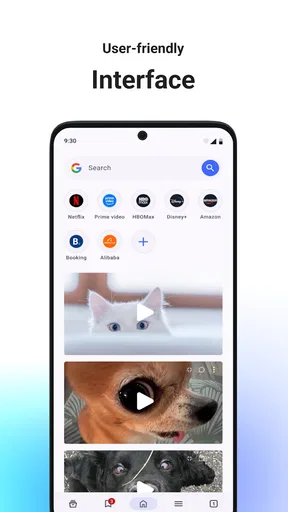
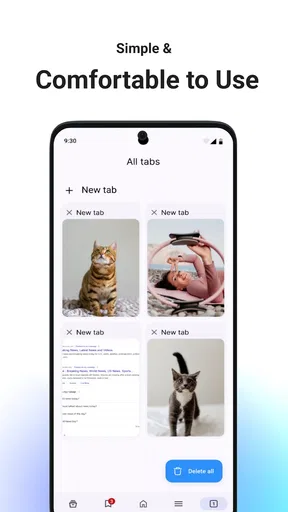
 Analysis by AppCompare
I tend to keep a browser open for ordinary daily tasks, so I pay attention to the small things: how quickly it gets out of the way, whether its layout feels clear, and whether I can use it without turning a simple search into a project. GloBro is a free communication app from Pizzawale Team, currently at version 1.9. Its stated purpose is straightforward: everyday browsing with a simple design and smooth performance. That makes it worth considering if you want a lightweight-feeling place to browse, though it is not a travel community or trip-planning app.
What the app is useful for now
The practical question is whether GloBro suits the way you browse on a normal day. I would consider it for quick searches, opening pages while moving between everyday tasks, and keeping a familiar browser available on a phone. A browser earns its place through repeated small jobs rather than one dramatic feature: checking a detail someone mentioned, reading an article during a break, or looking something up before heading out.
That everyday focus can be a plus if you do not want a browser that feels crowded with extras. The trade-off is that simplicity alone does not establish whether it has the particular tools you rely on, such as advanced tab organization, privacy controls, or deep syncing across devices. If those are essential, check the app’s current options before making it your main browser. For casual browsing, the more useful test is whether its basic layout and response suit your habits.
How I would fit it into a daily routine
Imagine you are on the way to meet a friend and need to check a café’s opening details, then read a message with another place to compare. A browser that feels quick to open and easy to navigate can make that sequence less distracting. I would use GloBro for that sort of short, practical browsing, then decide after several ordinary sessions whether its interface feels comfortable enough to keep as my default.
A useful way to test it is to try the same routine you already use in your current browser: open a few pages, switch between them, return to a page you were reading, and see whether the controls make sense without hunting. This reveals more than a brief first launch. If you often browse on a small screen, notice whether the layout leaves enough room for the page itself and whether everyday navigation feels natural to you.
Who may want it, and who may not
I can see GloBro appealing to someone who wants a free, uncomplicated browser for routine use and is happy to judge it by its day-to-day feel. It may also suit a person trying a different browsing app without immediately committing to a paid product. The app is rated for Everyone, and its broad age rating makes it suitable for a general audience, though families should still use their own judgement about online browsing and supervision.
I would hesitate to recommend switching if your current browser is already tied closely to your passwords, bookmarks, work accounts, or other devices. Moving browsers can create small but persistent inconveniences if your usual setup does not carry over in the way you expect. Likewise, if you need a browser specifically for strict privacy management, accessibility options, or specialized work tools, compare those exact settings first rather than assuming a clean design covers them.
Worth Reading Before You Choose

EA SPORTS FC Mobile 26 Is a Bigger Football Game, but It Takes Time

Flipboard Shows What News Apps Must Do Beyond the Feed

Switching to Android Auto Means Rethinking Your Driving Routine

Google Calendar Makes a Crowded Week Easier to Manage

Ludo King Makes the Most of the Minutes Between Plans

Baby Panda World Brings Quick Play to Modern Phones, but Its Game Library Feels Busy
How it compares with familiar browser choices
Compared with a browser already bundled with a phone, GloBro has to earn its spot by feeling easier or more pleasant for your particular routine. The preinstalled option often benefits from familiarity and may already fit into the device’s ecosystem. A separate browser is more compelling when you prefer its interface or want to try a distinct everyday browsing experience, but the switch is only worthwhile if it solves a real annoyance.
Against feature-heavy alternatives, the appeal here is the emphasis on straightforward browsing rather than a long list of tools. That can mean less to learn, but it also means users who depend on advanced customization should verify that the available controls meet their needs. I would treat GloBro as a candidate for ordinary browsing, not assume it replaces every specialist browser or every built-in convenience.
Costs, version, and signs of momentum
The app is free to install, with in-app purchases listed from $4.99 to $54.99 per item. I would check what a purchase covers and whether it is relevant to my own use before paying; a free starting point does not mean every optional purchase will be worthwhile. If you only need everyday browsing, first see whether the free experience handles your regular tasks comfortably.
GloBro was released on December 14, 2025, and its current version is 1.9. Those facts establish its current release context, but a version number on its own does not tell me what changed between releases or prove how actively the app is evolving. Existing users can look at the version information when updating and decide whether the changes address something they care about. For a new user, the more immediate concern is whether the present version works well on their device.
Its average rating is 3.6 from around 6,200 ratings, while the app has passed 1 million installs. I read that combination as a reason to approach it with measured expectations: many people have tried it, but the average suggests experiences are not uniformly positive. Ratings can help set context, yet they cannot predict whether the layout and basic browsing flow will suit you. I would test it with low-stakes tasks before moving important routines over.
Small checks that make the trial more useful
Before deciding to keep it, try a few different kinds of pages rather than judging only by the first site you open. Read a longer article, use a page with several images, and return to a page after switching away. That gives you a better sense of the browsing experience you will actually get. If a page feels awkward, check whether the issue is the site itself or the way the browser presents it before drawing a broad conclusion.
Also consider your own habits around saved pages and repeat visits. If you regularly return to the same information, see how the app supports that workflow in its current version before making it your everyday choice. The practical tip is simple: do not move everything at once. Keep your familiar browser available while you test GloBro, and switch only if the new routine feels more convenient rather than merely different.
For device compatibility, the minimum operating system is Android 6.0. That gives owners of older Android devices a clear starting point, although compatibility alone does not guarantee the same experience across every phone. If the app matters for a particular device, install it there and try your own common tasks. GloBro is available as an Android app; iPhone users should not assume the same app or feature set is available to them.
What I would want to see over time
The strongest case for GloBro is also the standard it needs to meet: making routine browsing feel simple and smooth in practice. As it develops, I would pay attention to whether updates improve everyday navigation, keep the interface clear, and address the needs users actually bring to a browser. Those are sensible things to watch, not promises about what future releases will contain.
For people already using it, an update is most valuable when it improves a task they do often, not just because the version number changes. For someone deciding whether to install it, current performance and fit matter more than speculation. I would keep expectations grounded: the app’s stated role is everyday browsing, and that is the standard I would use to judge it.
Hey there! So, I’ve been playing around with this new app called GloBro lately, and let me tell you, it's quite the experience. If you’re into social networking apps that offer a little something extra, you might want to give this one a shot. Let me walk you through my journey with it.
First Impressions of GloBro
At first glance, GloBro looks like your typical social app. But once you dive in, you quickly realize it's got its own unique twist. The app focuses on connecting people through shared interests in travel and culture, which I found refreshing. The interface is sleek, with a vibrant but not overwhelming color scheme. The app loads pretty quickly, which is always a plus for someone as impatient as me.
Setting Up Your Profile
Getting started is a breeze. After the usual sign-up process, which you can do via email or social media, you’re prompted to set up your profile. This is where GloBro gets interesting. You’re encouraged to share not just the standard info but also your travel experiences, cultural interests, and even future travel plans. It’s like having a travel diary mixed with a social platform. Pretty cool, right?
Connecting with Fellow Globetrotters
The app’s main pull is its community feature. You can join groups or forums focused on specific interests like "Backpacking in Europe" or "Street Food Lovers." This is where GloBro shines. The users are genuinely passionate, and the discussions are lively. I found myself getting lost in conversations about hidden gems in Tokyo and the best hiking trails in Patagonia.
Features That Stand Out
One feature I particularly enjoyed is the "Travel Buddy" option. It connects you with other users who have similar travel plans or interests. I’ve already found a few potential companions for my next adventure. Another neat feature is the "Culture Swap," where you can exchange cultural experiences or even organize meet-ups with locals. It’s like having a global pen pal, but more interactive.
The app also offers a "Trip Planner" tool. It’s pretty handy for organizing your travels, with options to collaborate with friends or fellow users. You can add destinations, make itineraries, and even get recommendations based on your interests. It’s like having a personal travel assistant!
Usability and Design
Usability is key for any app, and GloBro doesn’t disappoint. The navigation is straightforward, and I rarely found myself confused about where to go next. The design is intuitive, and everything you need is just a tap away. The app’s responsiveness is also commendable, with minimal lag even when browsing through heavy photo galleries.
The Social Aspect
What makes GloBro different from other social apps is its focus on meaningful connections. It’s not just about posting photos or updates; it’s about sharing experiences and learning from others. The app encourages engagement through various interactive features, making it easy to strike up conversations and make friends from around the world.
Is GloBro Worth the Download?
In a word, yes. If you’re a travel enthusiast or someone looking to connect with like-minded individuals globally, GloBro is definitely worth trying out. It’s not just another social media app; it’s a platform that fosters real connections through shared experiences. Whether you want to plan your next trip or just learn about different cultures, this app has something for everyone.
So, if you’re itching to explore the world from your phone or seek new travel buddies, give GloBro a download and start your journey. You might just find your next adventure partner or discover a new place to explore!
Pros
- User-friendly interface for easy navigation.
- High-quality graphics enhance user experience.
- Wide range of customization options available.
- Seamless integration with social media platforms.
- Responsive and helpful customer support team.
Cons
- Frequent ads can disrupt gameplay or usage.
- Requires a stable internet connection to function.
- Limited offline features available for users.
- In-app purchases can be costly over time.
- Occasional bugs may affect performance.
FAQs for GloBro
What is GloBro, and what does it offer?
GloBro is a social networking app designed to connect people from around the world. It offers features such as instant messaging, video calls, and community forums. Users can share photos, create groups, and participate in live events. The app aims to foster global friendships and cultural exchanges.
Is GloBro free to use, or are there any in-app purchases?
GloBro is free to download and use, offering a range of features accessible to all users. However, it does include optional in-app purchases, such as premium memberships and special stickers, which enhance the user experience by providing additional functionalities and customization options.
How secure is my data on GloBro?
GloBro prioritizes user privacy and data security. The app employs end-to-end encryption for messages and calls, ensuring your communications remain private. Additionally, it has a comprehensive privacy policy and allows users to control the visibility of their profiles and personal information.
Can I use GloBro to connect with people who speak different languages?
Yes, GloBro supports multilingual communication with a built-in translation feature. This allows users to chat with people from different linguistic backgrounds seamlessly. The app automatically translates messages, making it easier to connect and communicate without language barriers.
What devices are compatible with GloBro?
GloBro is available for both Android and iOS devices. It requires Android 8.0 or later and iOS 12.0 or later. The app is optimized for smartphones and tablets, ensuring a smooth user experience across different screen sizes and device capabilities.


